One App.
Everything Organized.
Whether you have two wells or two hundred, MinRight gives you one clear, private place on your Windows PC to track your properties, payments, and paperwork. No more guessing what you own or what you're owed.
Properties, Owners & Chain of Title
Record every tract you own or have owned, with its legal description (PLSS section, township, and range; Texas abstract and survey; or metes and bounds), county, and gross, net mineral, and net royalty acres.
- Add yourself and each co-owner, and mark your own record so MinRight fills you in by default.
- Ownership interests: seven interest types, entered as a decimal or a fraction such as 1/64. MinRight warns when one type's interests on a property add up to more than 1.0.
- Chain of title: grantor, grantee, instrument, and recording details for every deed, will, and probate.
- Mark a property Pending Sale, or click Record Sale to mark it Sold and add the sale to its chain of title.
Leases, Wells, Operators & Pooling Units
Keep the terms of every lease: dates, primary term, royalty rate, bonus, and clauses such as Pugh, no-deductions, and cost-free royalty. When you save a lease with an expiration date, MinRight offers to add a lease expiration deadline.
- Wells with API number, type, formation, depths, and key dates, linked to their lease, operator, and property.
- Operators and lessees, so every check and lease points to the right company.
- Pooling units with their tracts, tract factors, and wells.
Every Check, Line by Line
Enter a check once, then add a line item for each well, product, and production month on the stub: volume, decimal interest, price, eight deduction categories, four tax categories, prior period adjustments, and suspense. MinRight adds up the check's totals for you.
- Warnings when a check's totals don't match its line items, when a cost-free or no-deductions lease shows deductions, and when a check number from the same operator is already in MinRight.
- Quick Add (Ctrl+Q) records a check's net amount in a few keystrokes when you don't need the detail.
- Monthly Comparison shows how your checks changed month to month over the last year.
Import Check Stubs from CSV
Bring in check stub data from a spreadsheet or your operator's CSV download. A four-step wizard maps the columns, matches the file's wells, operators, and owners to yours, and checks the whole file before it saves anything.
- Works with a file from a single producer or an export from your bank account.
- Reads common statement words ("crude", "BBLS", "MCF") and dates in the usual formats.
- Checks already in MinRight are skipped, so importing the same file twice doesn't add them twice.
Check a Division Order Before You Sign
Record each division order you receive and track it from Pending to Approved, Disputed, or Superseded. For royalty division orders, MinRight compares the operator's decimal with your recorded mineral interest times the lease royalty rate and shows whether they match, and by how much they differ.
Dashboard & Analytics
The Dashboard shows your properties, active leases and wells, year-to-date and month-to-date revenue, a revenue chart, the next 30 days of deadlines, and a Needs Attention list. The Analytics page charts every revenue, deduction, and tax category, plus production by month and your top wells by revenue.
- Filter by operator, well or lease, and product type.
- Time ranges from year to date to all time, or a custom range.
- Bar or line charts, and a "View as table" switch on every chart.
Year-End Earnings Report for Your CPA
At tax time, choose the year and the owner, and MinRight gathers your royalty income by product and operator, deductions, taxes withheld, the 1099s you received, and the property taxes you paid. For one owner it adds income by property, lease income, and owner expenses. Print it or save it as a PDF and hand it to your CPA.
- Enter the 1099s operators send you, then reconcile them against your checks, payor by payor.
- Record property tax (ad valorem) payments on each property, and owner expenses such as legal and accounting fees.
- Owned, Leased, and Sold property reports, with legal descriptions and documents, to print or save as PDF.
MinRight is a record keeper, not tax software: it does not calculate depletion or prepare returns. Leave those to your CPA.
Maps with BLM Section Lookup
See your properties on an OpenStreetMap map. In the 30 states that use the Public Land Survey System, MinRight downloads a section's boundary from the Bureau of Land Management. Click "Fetch Available Parcels" and check your quarters, quarter-quarters, and government lots: MinRight draws your boundary, adds up the acres, and writes the legal description.
- Boundaries are saved with the property, so each one downloads only once.
- Texas and eastern-state properties show as a pin from the latitude and longitude you enter.
Documents & Deadlines
Attach leases, deeds, division orders, and letters to the property, owner, lease, well, or lessee they belong to. Choose a document storage folder and MinRight copies each file there, so your paperwork lives in one place.
Track lease expirations, rentals, tax due dates, and your own reminders in one list. Overdue deadlines turn red, and the Dashboard shows what's due in the next 30 days. (MinRight doesn't send email or pop-up reminders, so check your Dashboard.)
Encrypted, with Backups You Control
Your records are kept in one encrypted database file on your computer, and its key is protected by your Windows user account.
- Automatic daily or weekly backups while MinRight is open, keeping as many as you choose.
- "Create Backup Now" for a backup before a big change.
- Portable backups: one password-protected .minright file to move your records to a new computer.
- "Export All as CSV" writes every table to a spreadsheet file.
Show Only What You Use
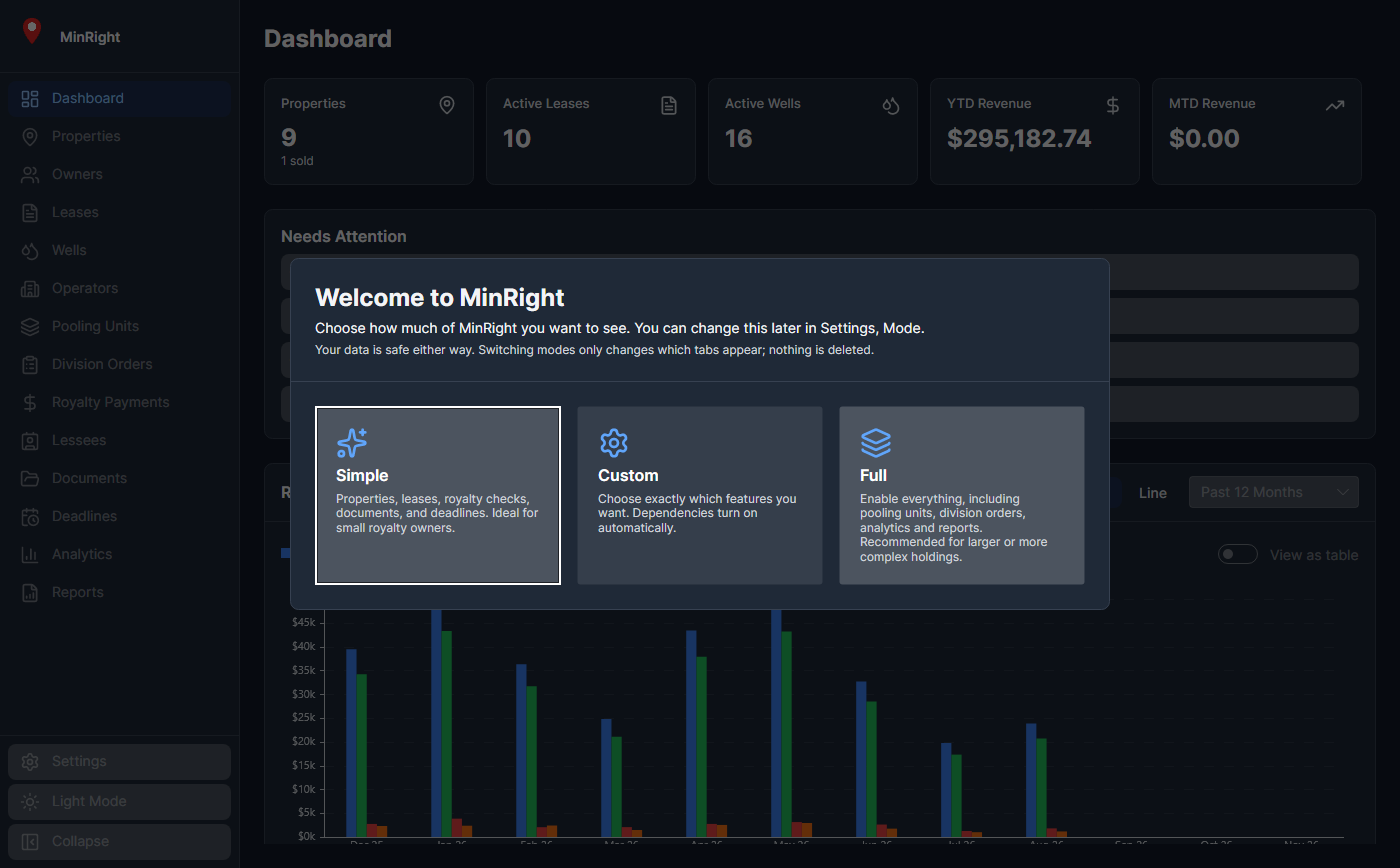
The first time MinRight opens, you choose how much of it to see. Simple mode shows properties, owners, leases, wells, operators, royalty checks, documents, and deadlines. Full mode adds pooling units, division orders, lessees, analytics, reports, ownership interests, and chain of title. Custom lets you pick. Switching modes never deletes anything.
System Requirements & Install
Windows only
Windows 11, 64-bit (x64). Windows 10 is not supported, and there is no Mac, Linux, phone, or web version.
One-click install
A Setup.exe signed by MinRight LLC installs MinRight for your Windows user account. Updates download and install from inside the app.
Help built in
Press F1 for searchable help topics. Keyboard shortcuts throughout (Ctrl+N to add, Ctrl+Q for Quick Add), light and dark themes, and zoom.
No account
You need a license key, not an account. MinRight goes online only for license checks, updates, map tiles, and BLM lookups. Details.
Ready to Get Organized?
Put everything in one place. You'll wonder why you didn't do it sooner.